I have just finished publishing a new version of the home page (a.k.a. front page) for this site. Previously there was no difference between the main blog page and the home page. Now the home page is totally different, and I am proud! 🙂 I also noticed that the captcha module had an issue which was preventing the comments from being added. I was just too excited tonight, after spending a lot of time studying today I decided to take on the challenge. This just shows my squiggly nature!
That’s correct, that is the Eiffel Tower in the background, and it’s not fake! 🙂 This picture was taken on my trip to Europe in March of 2006.
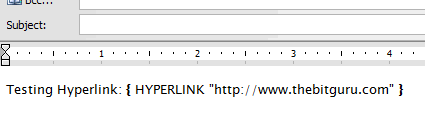
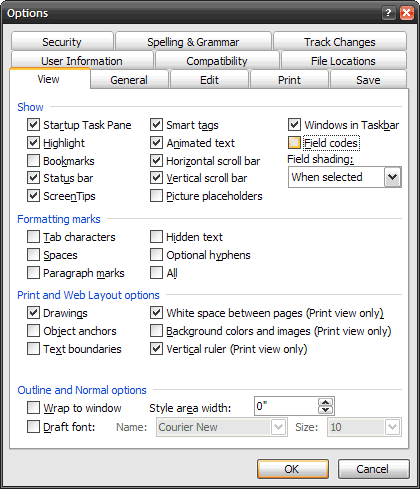
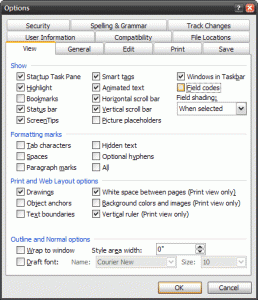
A few days ago I noticed that somehow the links and images that I was putting in my e-mails and MS Word documents were changing into { HYPERLINK "https://thebitguru.com" } or similar texts. I put up with it for a few days but then it became annoying enough that I had to find a solution. After some research I found out that somehow Word’s configuration was changed to display the “Field codes.” To bring it back to the original state, I had to uncheck “Field codes” on the “View” tab of the options.
On a second note, I was looking around for finding a way of deleting every other line in Vim to clean up a text file that I generated. Guess what I found out about, the normal command. To accomplish my specific goal I had to run :%normal jdd or the shorter version :%norm jdd; which deleted every other line. The normal command executes everything after it as a “normal” command, which in this case is, go down one line and dd, or in other words, delete it. That is just one way of using the normal command. I am excited to make this discovery because I can see myself utilizing this command in so many other ways. If you are curious, this is where I found about this specific command. Vim is truly an awesome editor!
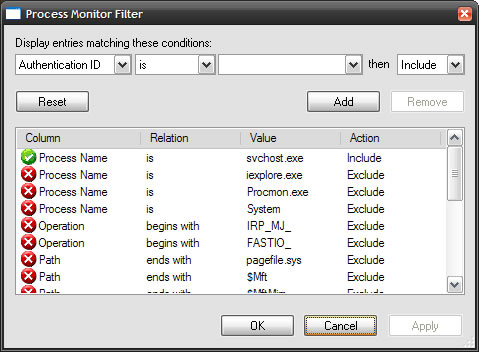
Majority of my job revolves around analysis and implementation of HL7 interfaces. Friday, I got a unique opportunity to test my skills. Basically, our front-end GUI application was instantiating a third-party object using the CreateObject call but it was not able to instantiate the object. Unfortunately, the application error logging did not point to anything specific, and since this was on a Citrix server, it would not be easy for easy to install the IDE and debug through the code. So, we had to look at alternatives. The first two things that were brought up were FileMon and RegMon. After spending about an hour analyzing the calls that were going and verifying almost each one we found out that the cause was a Windows Registry permission.
Just thinking about it, my “almost jack of all trades” quality proved to be of great use 🙂 What I mean is that, most of the times when I am working on something, in addition to doing the basic things I also do things around it, a lot of time on things that you wouldn’t normally do. For instance, I was working on an application that created a few DLLs, so there were times when I had to verify the locations and versions of these DLLs. I looked around on the internet and found a few applications, but I had to work around the quirks of these applications to get the information that I needed. Well, guess what I did? After a few uses of these applications, I went and wrote one for my specific needs. In order to write this app I had to learn the ins and outs of COM components and how it was laid out in the Windows Registry. At that time it was probably overkill, but this knowledge became very useful when I was helping troubleshoot the issue on Friday. I always knew that this extra knowledge was not a waste of time; it’s just a fairly long term investment! =D
Coming back to the topic: ProcessMonitor. Sysinternals has recently released the next version of FileMon and RegMon utilities, called ProcessMonitor. I have been playing around with ProcessMonitor and it is a very good progression of these utilities. If you use either FileMon or Regmon, you have to checkout ProcessMonitor.
I finally took some time and wrote the simple .htaccess rule for redirecting traffic from farhan-ahmad.net to thebitguru.com. Both the domains are served through the same directory so I just updated the .htaccess file and added the following rules above the Rails rules.
RewriteCond %{HTTP_HOST} (www.)?farhan-ahmad.net$ [NC]
RewriteRule ^(.*)$ https://thebitguru.com/$1 [L,R]
A few months ago I was looking for add-ons for Windows that would emulate the most common Linux window managers’ ALT+Right-click window resize and ALT+Left-lick window move features, when I stumbled upon Nuonsoft’s ShellEnhancer. Originally I was using it mainly for just those two features, but as time passed I started utilizing more of it’s features like the “Always on Top” context menu entry. One of the issues that I had was that it wouldn’t deal well with one of the mains programs we used at work.
Well, finally Nuonsoft has released ShellEnhancer 3.0, which is quite an improvement. The best part is the hot key feature, for which I am currently using GeoShell. If only ShellEnhancer had some way of popping up menus, I would replace GeoShell with it. Checkout the long list of changes and bug fixes. If you are looking for ways of improving your computing productivity, make sure you check out this utility.
For your task switching needs, ShellEnhancer also has a built in ALT-TAB replacement, but I still prefer the features that TaskSwitchXP provides. If you are only looking for the window moving functionality then there is always the KDE Mouse Emulator.
Most of my very recent past few weeks have been spent working, and studying for the GMAT. My original goal for the GMAT date was too optimistic and I have decided that this time I am not going to do an “almost there work.” I have come to realize that most of the things that I done in the part weren’t complete. I would complete eighty to ninety percent of the work, knocking out most of the hard parts, but then, either give up on the last ten percent, or do it after some time, when it didn’t matter any more. Guess what? Because of that last ten percent, I get only fifty percent of the reward! What’s up with all the percents?!! Man, GMAT is getting to my head! 🙂 So, I will be seriously concentrating on studying for the GMAT and work for the next few weeks. Wish me luck! =D
I noticed that the blog RSS feed is sending the articles in the wrong order. I will have that resolved soon after I take the GMAT. GMAT, GMAT, GMAT!
So far I haven’t worried about backing up my system, mainly relying on plain luck. Fortunately, luck has been on my side. A few weeks ago I decided to format my Windows installation because there were issues that I just didn’t want to spend time troubleshooting. That is when the subject of backup came up again. I wished that I had a backup solution in place so I could just format the system without worrying about loosing any data. That’s when I decided to start spending some data analyzing my options and coming up with solutions.
Finally, after a few weeks of little bits of researches, I have found the solution. I played around with rsync, Microsoft’s SyncToy, SyncBack, and a few others; in the end settling on SyncBack. It is simple enough and does exactly what I want to do, a differential-mirror backup. If you are interested in backup solution, make sure to give SyncBack a try, especially since it’s free! 2BrightSparks also has an advanced, paid version called SyncBack SE, and I am still in the process of deciding if I should upgrade to that.
Last night I was moving the Shahab Lab website to Site5 and had the need to lookup some Rails commands. Looking around I found a few different resources, some were good, some were bad. To save you some time, below are a few that I thought were very good.
I switched to foobar2000 after Winamp declared it wasn’t going to save my playlists, mostly because I had been using my user profile for a while. It wasn’t just Winamp that gave me trouble, there were a few others. Anyways, I have been using a fairly simple setup of foobar, but today I decided I would see what was there. I ended up on this hydrogen audio thread, and I was amazed! People have made some crazy (read awesome) looking players out of the simple foobar.