I thought this was a hilarious video that depicted conference calls very well. Enjoy! 🙂
Author: farhan
Setting baud rate in Cisco Catalyst 3750 switch
I recently accidentally messed up a Cisco 3750 switch while upgrading the firmware on it. I ended up with a non-booting switch with the typical fast flashing SYST light. After finding a computer old enough with a serial port I got to uploading the .bin image, but the at the default baud rate of 9600 the 12M or so bin file would have take quite some time. After searching on google I found out that the following IOS command would set a higher baud rate.
1 |
set BAUD 115200 |
Still not fast enough, but an improvement. Some people have suggested using tftpdnld in rommon mode, but this was fast enough that I didn’t want to deal with rommon.
Remember to reset the baud rate after you are done.
1 |
set BAUD 9600 |
Updated Play Button iTunes Patch
I have published an updated version of the Play Button iTunes Patch that now correctly kills the remote control daemon after patching it. Thanks to @quicksnap for helping troubleshoot. Here is a link to the issue on github.
tmux and Example Config
I am a big fan of the tmux terminal multiplexer when SSH’ing into any hosts. Definitely check it out if you don’t know about it. By default tmux is pretty bare, but you can use my current .tmux.conf as a reference. The configuration file below will essentially create labels for each terminal showing the currently running program.
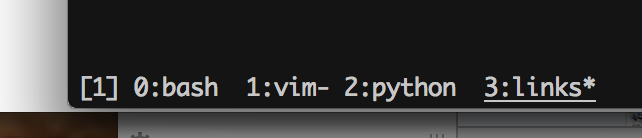
1 2 3 4 5 6 7 8 9 10 11 12 13 14 15 16 |
set-option -g default-terminal "xterm-256color" #set-option -g default-terminal "screen-256color" set-option -g status-fg white set-option -g status-bg black #set-option -g status-bg white set-option -g prefix C-a bind-key C-a last-window #set-window-option -g mode-mouse on setw -g window-status-current-attr underscore set -g status-keys vi setw -g mode-keys vi |
Lol, seriously Samsung?
Lol, I saw this Samsung ad shared on numerous websites. Seriously, is Samsung promoting stalking now? This is a waste of marketing dollars.
How to download offline Office 2013 Pro Plus installer from Office 365

I looked around quite a bit to find how to download an offline installer for Office 365 based Office 2013 Pro Plus, but, unfortunately, I didn’t find to-the-point instructions on this. So, here is my very quick guide to downloading Office 2013 Pro Plus offline installer from Office 365.
Impressed by Amazon’s Thoughtfulness

Yesterday I got a package from Amazon that I had requested overnight shipping on. At first sight it wasn’t anything unexpected, but when I opened the box I was surprised. I was surprised because along with the overnight shipped item, in a different session, I had also ordered another item with regular Amazon Prime shipping. To my surprise both the items were shipped overnight in the same box. Now that’s just awesome! Go you, Amazon!
Starting Countdown

OK, one more Apple event scheduled for October 22nd. I am really hoping that we’ll have new MacBook Pros announced this time. New iPads are pretty much guaranteed, but come on Apple, I want to upgrade my MBP (need Haswell)!
Something went wrong
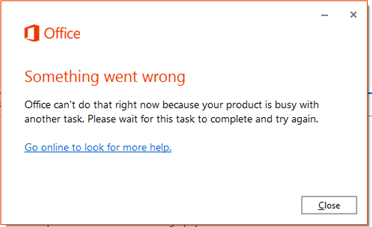
I was recently installing Office 365 Pro Plus on a new PC when I unintentionally accepted a restart prompt from another program resulting in the computer restarting. After the computer booted back up I tried to restart the Office install, but it kept refusing saying that “Office can’t do that right now because your product is busy with another task. Please wait for this task to complete and try again.”
Hoping for a MacBook Pro announcement soon
Apple has released the Golden Master OS X Mavericks to developers. I am hoping that this means that the new MacBook Pro will be released soon. I have been waiting for too long to upgrade my MBP!